
Email marketing can be a powerful channel for business growth.
Whether you’re looking to build brand awareness, generate leads, or drive sales – sending mass emails to your email distribution list can deliver impressive results.
But creating a successful mass email campaign isn’t as straightforward as it seems.
There’s a lot that needs to happen behind the scenes to make sure your email list is compliant with data privacy regulations, authenticated for deliverability, and sufficiently personalized to deliver the best results.
Simplelists streamlines the process of setting up mass email – making email marketing easy.
In this article, we’ll show you how simple it can be to set up your first mass email campaign on Simplelists, in 5 easy steps.
Step 1: Setting up your Simplelists account
To get started, you’re going to need a Simplelists account.
There’s no need to worry if you don’t currently have an account. You can sign up for a completely free one month trial of either our single list, or multiple list account.
A Single List account is ideal if your business has a single list of group email contacts and you only ever intend to send the same mass email to everyone on that email list.
Alternatively, a Multiple List account allows you to create unlimited lists – for example, creating segments within your main email list. This is ideal if your businesses want to send mass emails to different audiences based on factors like demographics, interests, or purchase history.
If you’re not sure which option is right for you, we’ve got a more detailed blog post about the functionality of Simplelists that can help you decide.
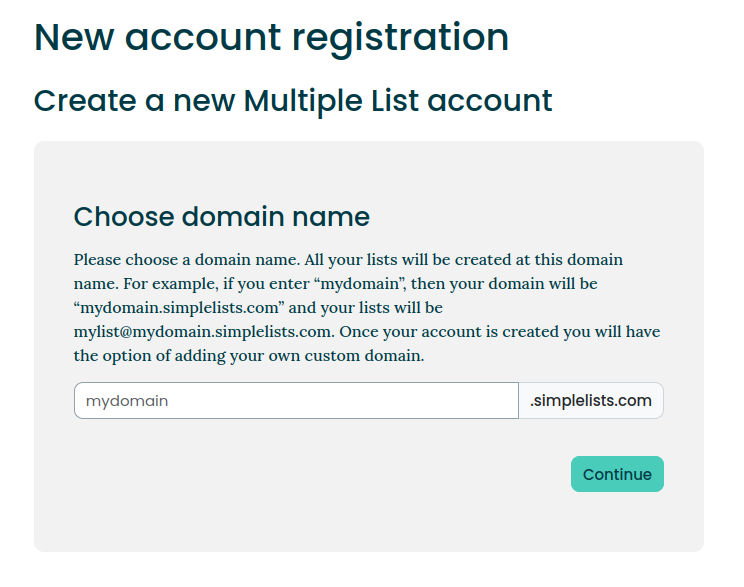
Whichever solution you choose, setting up your account is easy – all you need to do is type in your preferred account name, select your preferred pricing plan, and confirm your email address:
Step 2: Importing your email lists into Simplelists
Once you’ve set up your Simplelists account, it’s time to start building your email lists.
All your email lists and contacts for your mass email campaigns are managed through the ‘Address Book’ feature – and we’ve got a handy video to help guide you through the process.
There are several ways to import email addresses into your Simplelists Address Book, depending on your business needs and the size of your lists.
Add individual members
If you want to add a single contact to your list quickly, selecting ‘add member’ is your best option. This allows you to enter a single subscriber’s details directly into your address book.
Add multiple members
If you have a number of different subscribers that you want to add to your email distribution list, you can ‘add many.’ This allows you to add multiple contacts at once to your address book.
Add a bulk email list
If you have your email list in a CSV file, Simplelists makes it easy to import all your contacts at once. Simply click on ‘Upload file,’ navigate to the file containing the contacts that need adding to your email distribution list, and click ‘Upload.’ It’s that simple!
Automate the population of your email lists
Simplelists also allows you to automatically sync your contacts from other business tools or databases that Zapier supports. This can save you time and ensure your bulk email list is always up to date.
Before you upload any contacts into Simplelists, it’s important to make sure that you have a legal basis for emailing them, ideally through opt-in consent.
This means that the contacts on your list have explicitly agreed to receive marketing communications from your business.
Find out more about the steps you can take to ensure GDPR compliance for your email lists, and Simplelists approach as a data processor.
Step 3: Configuring email from your own domain
When you’re setting up Simplelists to deliver your mass email campaigns, you have the option to send emails from either a Simplelists domain (@yourname.simplelists.com) or your own custom domain (@yourdomain.com).
Each option has its benefits, and the choice ultimately depends on your specific business needs and priorities.
Using the Simplelists-provided domain is the quickest and easiest way to get started with mass email marketing. With this option, your emails will be sent from an established domain (simplelists.com), and it is a great choice if you want to get your campaigns up and running as quickly as possible.
However, using your own domain can help your business appear more professional in your mass email campaigns. But, it does require a bit more technical setup to authenticate your emails, and you’ll also need to have a multiple lists account with Simplelists.
If you opt to use your own domain, you’ll need to ensure you correctly set up DKIM, SPF, and DMARC authentication – which means making some additions to your MX records.
If this all sounds a little complicated, you don’t need to worry. We have a full article that explains the steps you need to take to use your own domain.
Step 4: Crafting your first email campaign
Once your Simplelists account is set up, your email list is imported, and your sending domain is authenticated, it’s time to create your first email campaign.
When you create an email in Simplelists, you have the option to choose between plain text and HTML.
Plain text emails are simple, straightforward, and compatible with all email clients. They’re also less likely to be flagged as spam. On the other hand, HTML emails are more visually appealing and engaging – helping with brand recognition, capturing the attention of your audience, and driving action.
There are certainly pros and cons either way when considering plain text vs HTML email templates for your mass email campaigns – and the choice really depends on your unique business needs and objectives.
Whichever approach you choose, you’ll need to make sure your mass emails have an appropriate footer that contains information like your business name, registered company address, and telephone number to comply with relevant legislation. You can also add other additions to your email footer, such as social media links and a subtle call to action to help improve email performance.
When you’re crafting your mass emails in Simplelists, you’re also able to personalize the subject line and body of your email.
Personalization, such as including the subscriber’s name or tailoring content based on their preferences, can significantly impact user experience and performance of your emails – improving open rates, click-through rates, and overall engagement. So, it’s something worth considering if you’re looking to get the most out of your mass email marketing campaigns.
Once you’re happy with your HTML or plain text email, you’re ready to select your relevant subscriber list within Simplelists and hit ‘send’.
Step 5: Measurement and optimization
After hitting send on your email and having it reach your target list of subscribers – you would be forgiven for thinking that this is ‘job done’ when it comes to mass email marketing.
But in reality, creating and sending emails to your distribution list is just the starting point of a mass email marketing campaign.
To achieve the best long-term results, it’s important to continuously monitor, measure, and optimize your campaigns based on key performance indicators (KPIs).
Some of the important metrics that you might optimize around include:
- Bounce rate
This is the percentage of emails that couldn’t be delivered to your subscribers’ inboxes. You want this to be as low as possible! There are a number of things you can do to influence bounce rate, including making sure you have the right authentication protocols set up and you follow sensible sending practices. But it can also be influenced by the quality of your email distribution list, as any incorrect or invalid email on your list will count as a ‘bounce.’ - Open rates
This refers to the percentage of subscribers that opened your email and can provide valuable insights into the effectiveness of your subject lines and the perceived relevance of your emails by your audience. - Click rate
A measure of the percentage of subscribers who clicked on a link within your email, this KPI is an indication of engagement and can help determine the effectiveness of your email content and CTAs. - Conversion rate
This measures the percentage of subscribers who completed your target action after clicking on your email – such as making a purchase or downloading a guide. This KPI is the ultimate measure of success for your mass email campaign.
Simplelists: All the features and functionality you need for successful mass email
Effective mass email can be transformative for a business.
However, there is more involved in setting up a successful mass email marketing campaign than many people consider.
Simplelists makes the process easy, with intuitive email list management tools, the ability to send from your own domain, full support for HTML emails and personalization, and the ability to measure important deliverability metrics.
With recent additions to the platform, such as email list automation, Simplelists is more valuable than ever for mass email marketing.
Experience the benefits of Simplelists for yourself, with a one-month free trial.