
When you’re crafting an email for your audience, you’ll probably spend a lot of time coming up with a compelling subject line to try and improve the open rate and avoid triggering spam filters.
Listserv management is a crucial part of every business.
In the digital communication landscape, email is one of the most traditional channels.
It has been estimated that just under 80% of emails sent by email marketers to people who signed up to your list reach the inbox. This is a pretty staggering number when your recipients have subscribed legitimately. This is because spam filters are becoming increasingly sensitive to make sure that non-legitimate emails do not get delivered. To avoid your email ending up in the spam folder, there are some simple things you can do.
We have written on this blog before about the importance of email deliverability and what we do to ensure your emails reach their recipients. Spam filters implemented by different email clients (Gmail, Yahoo, Hotmail, etc.) are becoming increasingly sensitive, to make sure that non-legitimate, spam emails aren’t delivered. Ensuring emails are delivered to the inbox is pretty much guaranteed if your list members have 'whitelisted’ you. This means, simply, that you (as the sender) have been added to their list of 'approved’ or 'safe senders’. Different email clients carry out the whitelisting process in different ways and use different terminology. In this short post, we explain how to whitelist email addresses in Gmail.

Your landing page is often the first impression potential customers have of your business. Visitors form judgements within 50 milliseconds of arriving, and 75% make their initial assessment within three seconds. Strong, consistent branding builds immediate trust and signals professionalism.

This guide is for Simplelists list members and list managers who need to locate specific emails within a busy mailing list archive. It covers how to access the archive, how the keyword search works, and advanced techniques – including wildcard searches – that help when you are not sure of the exact term to look for. If you have not yet enabled your archive, start with the guide on how to set up, view, and customize your email archive first.

HTML emails are formatted like a web page and can include colours, graphics, tables and links. Most emails that you receive from a shop/business that you subscribe to are likely to use this kind of email. Plain text emails are more like what you might expect to receive from a friend or in a typical work email. Before sending an HTML email to your list, it is worth considering the pros and cons of HTML and plain text emails.
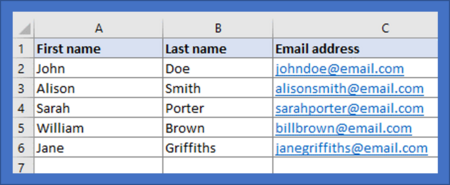
When you start to build an email list you may only have a few members. If this is the case, inputting people’s details manually via the Simplelists members area is straightforward. When your list starts to grow, you may find it helpful to add a large number of subscribers at one time, from a spreadsheet. It is also useful to have a spreadsheet copy of all your list members for your own records. In this short post, we explain how to add members to your list from a spreadsheet.
If you run a mailing list for a club, association, or professional group, adding a subscribe form to your website is the step that makes joining frictionless and keeps your list legally clean. Without a form, someone who wants to join has to contact you, you add them manually, and the record of that consent lives nowhere. With a form, they enter their details, Simplelists can send a confirmation email, they click the link, and they are on the list. You have done nothing except set it up once.
It is becoming more widely accepted that 'no-reply’ email addresses can be harmful to an email campaign. The 'no-reply’ email address effectively stops, or tries to put people off from, replying to your emails. While this may help to ensure that your inbox doesn’t become cluttered, it gives a negative message to readers - in effect, you don’t want to hear back from them. This probably isn’t good for business. If you still use 'no-reply’ email addresses in your business/email marketing communications, this post contains some reasons why you might want to stop.
When subscribers click through from your emails, the page they land on shapes their impression of your organization. Research from Unbounce shows that email traffic converts at 19.3% – the highest conversion rate of any marketing channel – making these landing pages among the most valuable touchpoints for any mailing list. Whether you’re running a community club, university department, or business newsletter, consistent branding helps recipients recognize your organization instantly and builds the trust that leads to higher engagement.
