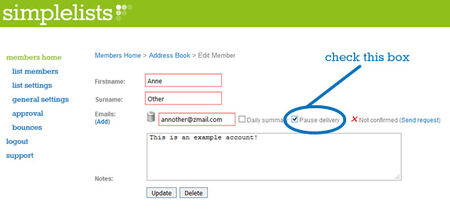
Some of our customers have requested a feature where members can take a break from receiving list emails rather than completely unsubscribe. We could see that this feature would be useful in a lot of situations...

Email now takes up a significant part of almost everyone’s working day. If you spend more than an hour each day using email it makes a lot of sense to make your email routine as efficient as possible.

We’ve just completed a series of short videos on subscribe forms. These videos take you through everything that you need to know to place a subscribe or unsubscribe form on your website: adding a the form to your site, customising the form to suit your needs and styling the form to match your website perfectly...

If you’ve ever sent an announcement to your club, nonprofit, or organization’s mailing list only to panic when it doesn’t show up in your Gmail inbox, you’re not alone. With 1.8 billion Gmail users worldwide and Gmail accounting for roughly 24% of all email opens, this behavior affects nearly every mailing list in existence. The good news? Your message was delivered successfully to everyone else. The frustrating part? Gmail has maintained this “feature” for over 15 years with no plans to change it.

If you’re setting up a discussion group these days you have a lot of options to choose from. You could use a social media platform, such as a Facebook ’closed’ group, to host your discussion or you could choose to use a group email service like Simplelists.

We’ve recently produced some videos with instructions on how to use your own domain with your email lists. The main advantage to using your own domain is that you can brand the entire Simplelists system as your own.

We are very happy to let you know that Simplelists have acquired DiscussThis, another group email service.

Whether you’re managing a club newsletter, a community discussion group, or internal team communications, your landing page is often the first impression potential members have of your organisation. Getting it right means the difference between a growing, engaged community and a stagnant list.

We wrote recently about the problems created by Yahoo’s decision to prevent their emails being forwarded through mailing lists with an unaltered sending address.

At Simplelists we’ve long been conscious of the problems caused by forged email addresses. You will no doubt have seen such emails yourself, such as your banking supposedly informing you that your account has been suspended.

Simplelists is designed to be really easy to use with only very basic computer skills needed to manage your email list - if you can click and type you can use Simplelists! However, there are also a range of technical features which open up a world of options for more advanced users. One of these is an API...