
When you send emails to your list using Simplelists it is possible to insert members’ names into the emails. This personalises the message and allows recipients to see their name in the short email preview they may see in their inbox. This short post explains how to use this feature.

The UK’s email marketing compliance landscape has undergone its most significant transformation since Brexit. The Data (Use and Access) Act 2025 closes a long-standing enforcement gap by aligning PECR fines with UK GDPR penalties – meaning organisations now face potential fines of £17.5 million or 4% of global turnover for non-compliant email marketing, whichever is greater.

Your landing page is often the first impression potential customers have of your business. Visitors form judgements within 50 milliseconds of arriving, and 75% make their initial assessment within three seconds. Strong, consistent branding builds immediate trust and signals professionalism.

This guide is for Simplelists list members and list managers who need to locate specific emails within a busy mailing list archive. It covers how to access the archive, how the keyword search works, and advanced techniques – including wildcard searches – that help when you are not sure of the exact term to look for. If you have not yet enabled your archive, start with the guide on how to set up, view, and customize your email archive first.

Simplelists works for any organization that needs to send emails to a group and wants more control, reliability, and privacy than a free service provides. Common users include:

HTML emails are formatted like a web page and can include colours, graphics, tables and links. Most emails that you receive from a shop/business that you subscribe to are likely to use this kind of email. Plain text emails are more like what you might expect to receive from a friend or in a typical work email. Before sending an HTML email to your list, it is worth considering the pros and cons of HTML and plain text emails.
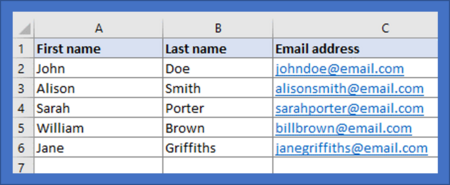
When you start to build an email list you may only have a few members. If this is the case, inputting people’s details manually via the Simplelists members area is straightforward. When your list starts to grow, you may find it helpful to add a large number of subscribers at one time, from a spreadsheet. It is also useful to have a spreadsheet copy of all your list members for your own records. In this short post, we explain how to add members to your list from a spreadsheet.

If you run a mailing list for a club, association, or professional group, adding a subscribe form to your website is the step that makes joining frictionless and keeps your list legally clean. Without a form, someone who wants to join has to contact you, you add them manually, and the record of that consent lives nowhere. With a form, they enter their details, Simplelists can send a confirmation email, they click the link, and they are on the list. You have done nothing except set it up once.

Simplelists is designed to be flexible so that it will suit your needs exactly. You might want to send email newsletters to a list of customers with you alone being able to post to the list. Or, maybe you have a team of people who will all need to be able to send emails to your customers. Or, perhaps you would like to use your list for a private group discussion and you would like anyone on the list to be able to contribute. Whatever your needs, you can customise your list by setting posting permissions. In this short post, we explain how you do this.

We have already discussed on our blog how a well thought-out and well-designed footer on your email can ensure that your email complies with the law and avoids being marked as spam. The footer is a good place to include your contact information, invite recipients to visit your social media links, remind them why you are receiving the email, and include links to other important places (for example, your privacy policy or other news items on your website). In this short post, we remind you how to add a personalised footer to your emails when using Simplelists.

Simplelists is designed to be quick, easy and simple to use. It also has a collection of powerful features for users who want more from their email management software. In this short post, we remind our customers of the power of Simplelists and let those who are thinking of joining us know about the range of features available.

If you have a multiple list account, you can use your own domain to replace simplelists.com. In fact, you can add as many domains as you like, which means you can totally brand the system as your own. Combine using your own domain with branding your landing pages for truly professional results. This short post will explain how to use your own domain and, once you have done this, how to improve the deliverability of your emails.
