
Email marketing is nothing new. It has been around since the widespread adoption of digital communications. That’s almost three decades, give or take a few years. Yet even today, in 2023 leveraging a strong discussion list as part of your email marketing is still one of the most effective ways for businesses to reach and influence new and existing audiences.

Listserv management is a crucial part of every business.

Two of the most popular reasons that our customers use Simplelists are as a listserve and for email marketing. However, these are not the only things you can use it for. We have designed Simplelists to be flexible so that you can complete a range of tasks. Here are some of the key ones.

Simplelists offers you a range of options for managing your group email. It’s important to note that we offer free trials for single and multiple list accounts so you may want to use these to carry out a one-off email campaign or have a go at setting up a group list. In this post, we explain the types of accounts in more detail so you can make the right choice to suit your needs.

Simplelists is designed to be quick, easy and simple to use. It also has a selection of powerful features for users who want more from their email management software. People who sign up to Simplelists do so for many reasons. They may want a way to manage group email discussions, use email for marketing purposes, or send regular updates and other information to list members. We are often asked what Simplelists can do, so this short post is a reminder of our features.

HTML emails are formatted like a web page and can include colours, graphics, tables and links. Most emails that you receive from a shop/business that you subscribe to are likely to use this kind of email. Plain text emails are more like what you might expect to receive from a friend or in a typical work email. Before sending an HTML email to your list, it is worth considering the pros and cons of HTML and plain text emails.

Simplelists is designed to be quick, easy and simple to use. It also has a collection of powerful features for users who want more from their email management software. In this short post, we remind our customers of the power of Simplelists and let those who are thinking of joining us know about the range of features available.
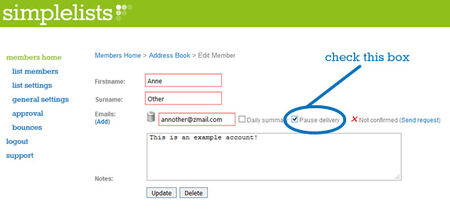
Some of our customers have requested a feature where members can take a break from receiving list emails rather than completely unsubscribe. We could see that this feature would be useful in a lot of situations...

We’ve just completed a series of short videos on subscribe forms. These videos take you through everything that you need to know to place a subscribe or unsubscribe form on your website: adding a the form to your site, customising the form to suit your needs and styling the form to match your website perfectly... Adding A Form To Your Website This is very simple - just login to your simplelists account, navigate to 'general settings’, select 'subscriptions’ and you’ll see the code which you can copy and paste to your website.

If you’re setting up a discussion group these days you have a lot of options to choose from. You could use a social media platform, such as a Facebook ’closed’ group, to host your discussion or you could choose to use a group email service like Simplelists.

We’ve recently produced some videos with instructions on how to use your own domain with your email lists. The main advantage to using your own domain is that you can brand the entire Simplelists system as your own.

Simplelists is designed to be really easy to use with only very basic computer skills needed to manage your email list - if you can click and type you can use Simplelists! However, there are also a range of technical features which open up a world of options for more advanced users. One of these is an API...
